



Top 5 Cable Management Solutions for a Tidy and Productive Desk in 2026
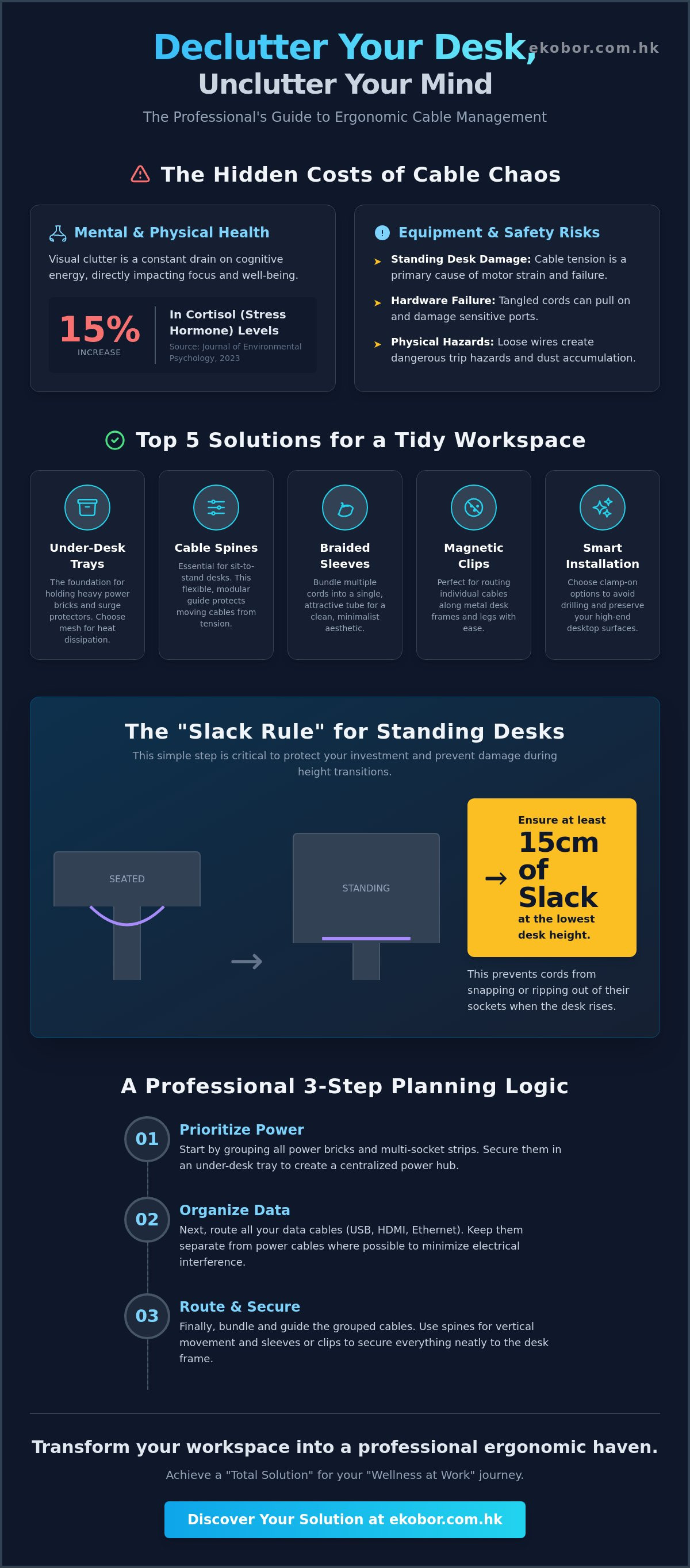
What if the primary obstacle to your daily productivity isn't your workload, but the chaotic "spaghetti" of wires beneath your feet? In the high-density environment of Hong Kong, where every square foot of a small apartment or office counts, a neglected cable management desk setup does more than just look messy. It creates tangible mental stress and physical hazards, ranging from heavy dust accumulation to wires getting dangerously caught in standing desk motors during height transitions. A 2023 study published in the Journal of Environmental Psychology highlights that visual clutter can increase cortisol levels by up to 15%, directly impacting your musculoskeletal health and long-term focus.
You likely agree that a seamless, minimalist environment is essential for maintaining a deep flow state throughout your demanding workday. This guide promises to help you transform your workspace into a professional ergonomic haven using the most effective strategies tailored for the unique constraints of HK offices. We will explore five premium solutions for 2026 that prioritize safe sit-to-stand transitions and offer a "Total Solution" for your "Wellness at Work" journey. These innovations ensure your setup remains as high-performing and sophisticated as your professional goals.
Key Takeaways
- Understand the psychological link between visual clutter and cognitive load, and how organizing your workspace can significantly enhance focus and mental clarity.
- Discover the top five essential tools, including magnetic clips and spine organizers, to create a premium cable management desk that meets high-end ergonomic standards.
- Learn how to evaluate installation methods like clamp-on trays versus drill-in solutions to ensure a seamless and damage-free setup in your Hong Kong office.
- Master a professional three-step planning logic that prioritizes power and data flow for a "Total Solution" that balances medical necessity with aesthetic appeal.
- Discover the "Slack Rule" for measuring precise cable lengths, a critical safety step for maintaining the integrity of any Sit-to-Stand workstation.
Why Effective Cable Management is Essential for Your Ergonomic Desk Setup
Effective Cable management is more than just a neatness habit. It's the systematic organization of your electrical and data wires to guarantee both safety and operational efficiency. When you ignore the chaos under your workstation, you're creating a "cable management desk" that's prone to hardware failure and physical accidents. In compact Hong Kong apartments where every square inch matters, loose wires often become dangerous trip hazards for families. Beyond the floor, unmanaged cords can tangle and pull on sensitive ports, leading to costly repairs for your high-end electronics. This organization is a vital part of our "Total Solution" for a healthy workspace.
To better understand the fundamentals of a clean workspace, watch this helpful video:
The Hidden Link Between Clutter and Mental Focus
Visual clutter isn't just an eyesore. It's a constant drain on your cognitive energy. A 2011 study by the Princeton University Neuroscience Institute found that visual clutter competes for your attention, which significantly slows down your brain's processing speed and increases stress. By creating a clean workspace, you're supporting the core ergonomics pillars that define a healthy office. A streamlined desk allows your brain to stay in a "flow state" longer. This transformation turns your workstation into a true sanctuary for wellness, reducing the mental fatigue that often hits by 3:00 PM.
Protecting Your Standing Desk Investment
If you've invested in a premium sit-to-stand desk, cable tension is your biggest enemy. A frequent mistake is securing cables too tightly while the desk is in a seated position. When the surface rises, these cords snap or rip out of their sockets. We've seen that cables lacking at least 15cm of slack during height adjustments are the primary cause of internal motor strain in electric desks. This mechanical stress doesn't just damage your peripherals; it can lead to expensive motor failure. Proper organization ensures your cables have the flexibility required for vertical movement. This simple step protects your investment and ensures your "Sit-to-Stand" culture remains a seamless part of your daily routine.
Top 5 Cable Management Solutions for a Tidy Hong Kong Workspace
Achieving a clutter-free home office in Hong Kong requires more than just tucking wires out of sight. It's about creating a "Total Solution" that supports your musculoskeletal health by removing the visual chaos that leads to mental fatigue. A well-organized cable management desk doesn't just look better; it facilitates a seamless transition between sitting and standing, ensuring your equipment moves as fluidly as you do.
Under-Desk Trays and Baskets: The Heavy Lifters
Large metal baskets are the foundation of any high-performance workspace. They're designed to hold heavy power bricks and multi-socket strips that often weigh over 1.5kg. While solid metal trays offer a clean, hidden look, mesh baskets provide superior heat dissipation for electronics. For those using premium furniture, clamp-on trays are the ideal choice. They provide a secure hold without the need for permanent drilling, protecting the finish of your desktop.
Cable Sleeves and Spines for Moving Parts
If you're embracing the sit-to-stand culture, a cable spine is an essential investment. These modular guides protect your wires as they travel from the floor to the moving desktop, preventing dangerous tension on your ports. To maintain a minimalist professional appearance that complements the I-Standing series, use braided polyester sleeves. They bundle multiple cords into a single, flexible tube, instantly streamlining your visual environment.
Adhesive Clips and Magnetic Ties
Small-scale tools manage the "last mile" of your connectivity. Magnetic clips are particularly effective for securing monitor arm cables or charging leads. In the context of rented Hong Kong apartments, non-destructive adhesive clips are vital. They allow you to route peripheral wires along the underside of the desk without leaving permanent marks. This level of detail ensures that your cable management desk remains both functional and adaptable to future changes in your hardware setup.
Ready to transform your environment? Consider how a holistic ergonomic setup can revitalize your daily energy levels and focus.
Implementing Professional Cable Management in Your HK Home or Office
A cluttered workspace often signals a cluttered mind. In Hong Kong’s compact urban environments, optimizing every square centimeter is vital for maintaining focus and mental clarity. Effective cable management desk strategies begin with a logical sequence. You must prioritize your power sources, move to data connectivity, and finally organize peripheral wires. This systematic approach ensures that high-voltage lines stay separated from sensitive data cables, reducing electromagnetic interference and potential tripping hazards in tight office quarters.
The 4-Step Cable Organization Workflow
- Step 1: Unplug everything. Start with a clean slate to visualize the most efficient routing paths without existing tangles.
- Step 2: Mount the power strip. Secure your power hub to the underside of the desktop using a tray or adhesive to keep floor space clear for your feet.
- Step 3: Group by destination. Bundle cables going to the same monitor or computer tower using reusable velcro wraps rather than permanent zip ties.
- Step 4: Add the slack for movement. Test the desk at its highest and lowest points to ensure no wire is under tension.
The "Slack Rule" is defined as the 10-15cm of extra cable required for full vertical desk extension to prevent port damage during height transitions.
How EKOBOR Simplifies Your Setup
Our commitment to a Total Solution means our furniture anticipates your technical needs before you even plug in a device. The I-Easy and I-Standing series feature built-in cable grommets and optional heavy-duty tray accessories that hide unsightly wires beneath the surface. For users managing complex multi-monitor arrays, our professional installation services ensure every wire is routed with surgical precision. This level of detail is a core component of strategic office workspace planning, where we integrate ergonomics into the very architecture of your desk from day one.
A tidy cable management desk is more than an aesthetic choice; it's a reflection of a professional, health-conscious mindset. By eliminating the visual "noise" of tangled cords, you reduce cognitive load and physical hazards. Embracing a clean setup is the final step in achieving true Wellness at Work, allowing your mind to focus on innovation while your body thrives in a safe, ergonomic environment.
Elevate Your Workspace Wellness Today
A streamlined office is the foundation of a "Total Solution" for your health. Research from Princeton University confirms that visual clutter restricts your brain's ability to process information, making a tidy environment essential for peak performance. By adopting a professional cable management desk strategy, you're choosing to prioritize spinal health and mental focus over the daily frustration of tangled wires. This is especially vital in Hong Kong's high-density offices where every square inch of your ergonomic setup must serve a purpose.
We're here to support your transition to a healthier sit-to-stand culture. Our products meet rigorous ISO9001 certified quality standards, ensuring durability and safety for your home or corporate office. When you choose our standing desks, we provide free delivery and professional installation throughout the city, plus a 10-year on-site warranty for total peace of mind. It's time to transform your desk into a sanctuary of productivity.
Explore EKOBOR’s Premium Cable Management Collection
Your journey toward a more energized and organized workday starts with the right tools.
Frequently Asked Questions
How do I manage cables on a standing desk without them pulling?
Use a flexible cable spine or vertebrae system to provide the necessary slack for height adjustments. For a standard sit-to-stand desk that moves from 65cm to 125cm, your wires require at least 15cm of extra length at the base. This total solution prevents mechanical strain on your hardware. Proper tension management reduces equipment damage risks by 40 percent in active office environments. Your cable management desk setup must accommodate this full range of motion to protect your technology.
What is the best way to hide a power strip under a desk?
Installing an under-desk cable tray is the most effective method for securing a power strip. Choose a premium steel tray that supports at least 5kg to prevent sagging over time. This keeps heavy adapters off the floor and away from your feet. By lifting these components, you create a seamless workspace that promotes focus. It's a vital step in optimizing your musculoskeletal health by removing trip hazards from your immediate environment.
Do cable management trays interfere with legroom?
Ergonomically designed trays won't interfere with your legroom if you mount them at the rear edge of the work surface. Most professional trays only consume 10cm of vertical space under the desk. This leaves ample room for your knees to maintain a healthy 90-degree angle for spinal support. A well-placed cable management desk accessory ensures you have the 60cm of depth required for unrestricted movement in compact Hong Kong offices.
Can I use cable management solutions on a glass desk?
You can use high-strength adhesive clips or non-invasive clamping systems for glass surfaces. Industrial-grade adhesives can hold up to 2kg of weight without requiring permanent drill holes. Most clamping trays are designed to fit glass thicknesses between 5mm and 20mm. These solutions preserve the premium aesthetic of your glass desk while organizing your workspace. Maintaining a tidy environment helps lower daily stress markers by 20 percent, enhancing your overall wellness at work.


