



How to Set Up Dual Monitors Ergonomically in Hong Kong: The 2026 Guide
What if your second screen is the primary cause of your chronic neck tension rather than your productivity's best friend? In a city where 80% of employees now embrace hybrid work according to Morgan McKinley, mastering how to set up dual monitors ergonomically Hong Kong style is no longer a luxury; it's a physical necessity. You've likely felt the strain of trying to fit a professional workflow into a compact apartment, only to end the day with stiff shoulders and eye fatigue from mismatched screen heights.
It's a common struggle, but your workspace shouldn't come at the cost of your physiological health. This guide will show you how to transform your desk into a pain-free, minimalist environment that aligns with the legal standards of the Occupational Safety and Health (Display Screen Equipment) Regulation. We'll explore the essential steps to utilize verticality and dynamic tools like Ergotron Lx Pro monitor arms to eliminate clutter, boost your multitasking efficiency, and finally achieve a state of professional well-being.
Key Takeaways
- Understand the critical alignment between your cervical spine and screen height to effectively combat the "Tech Neck" epidemic prevalent in high-intensity work cultures.
- Learn how to set up dual monitors ergonomically Hong Kong style by prioritizing the "nose-to-center" rule for your primary display to prevent repetitive torso twisting.
- Implement the top-third height adjustment rule to ensure your visual field remains within a comfortable range, significantly reducing chronic eye strain and shoulder tension.
- Discover how to reclaim valuable desk real estate in compact Hong Kong apartments by utilizing professional monitor arms to move your setup into the vertical dimension.
- Recognize why a static setup is insufficient for long-term health and how integrating dynamic movement via a standing desk completes your ergonomic transformation.
The Science of Sight: Why Dual Monitor Ergonomics Matter
Ergonomics isn't just about comfort; it's about aligning your digital environment with your biological blueprint. An ergonomic dual-monitor setup means positioning screens to respect the natural curvature of your cervical spine and the horizontal level of your eyes. In Hong Kong's fast-paced corporate environment, failing to do this leads to "Tech Neck," a condition where the head shifts forward, placing immense strain on the neck muscles. This is particularly prevalent in our high-intensity work culture where long hours are the standard.
When you look at studies on multi-monitor productivity, the benefits are clear, but the physiological cost is often ignored. Constant neck rotation to view a poorly placed second screen overworks the upper trapezius and levator scapulae muscles. This repetitive movement doesn't just cause physical pain; it drains your cognitive endurance. Understanding how to set up dual monitors ergonomically Hong Kong professionals find, is the secret to maintaining high performance throughout a long workday.
To better understand this concept, watch this helpful video:
Understanding the Visual Field and Eye Strain
Your eyes process information through foveal vision for detail and peripheral vision for context. If your monitors are spaced too far apart, your eyes must constantly refocus, leading to fatigue. To protect your vision, follow the 20-20-20 rule: every 20 minutes, look at something 20 feet away for 20 seconds. Convergence insufficiency is a specific condition where the eyes struggle to work together to focus on nearby objects, often aggravated by mismatched screen distances.
The Ergonomic Cost of 'The Gap'
A physical gap between your displays forces your neck to make thousands of tiny micro-adjustments every day. These subtle movements are a primary trigger for tension headaches and mid-back stiffness. Aim for a bezel-to-bezel alignment to create a seamless visual path. Additionally, ensure your brightness and resolutions match. If one screen is sharper or brighter than the other, your brain works significantly harder to process the inconsistent data. Learning how to set up dual monitors ergonomically Hong Kong style requires paying attention to these small details to prevent mental exhaustion before lunch.
The Golden Rules of Dual Screen Alignment
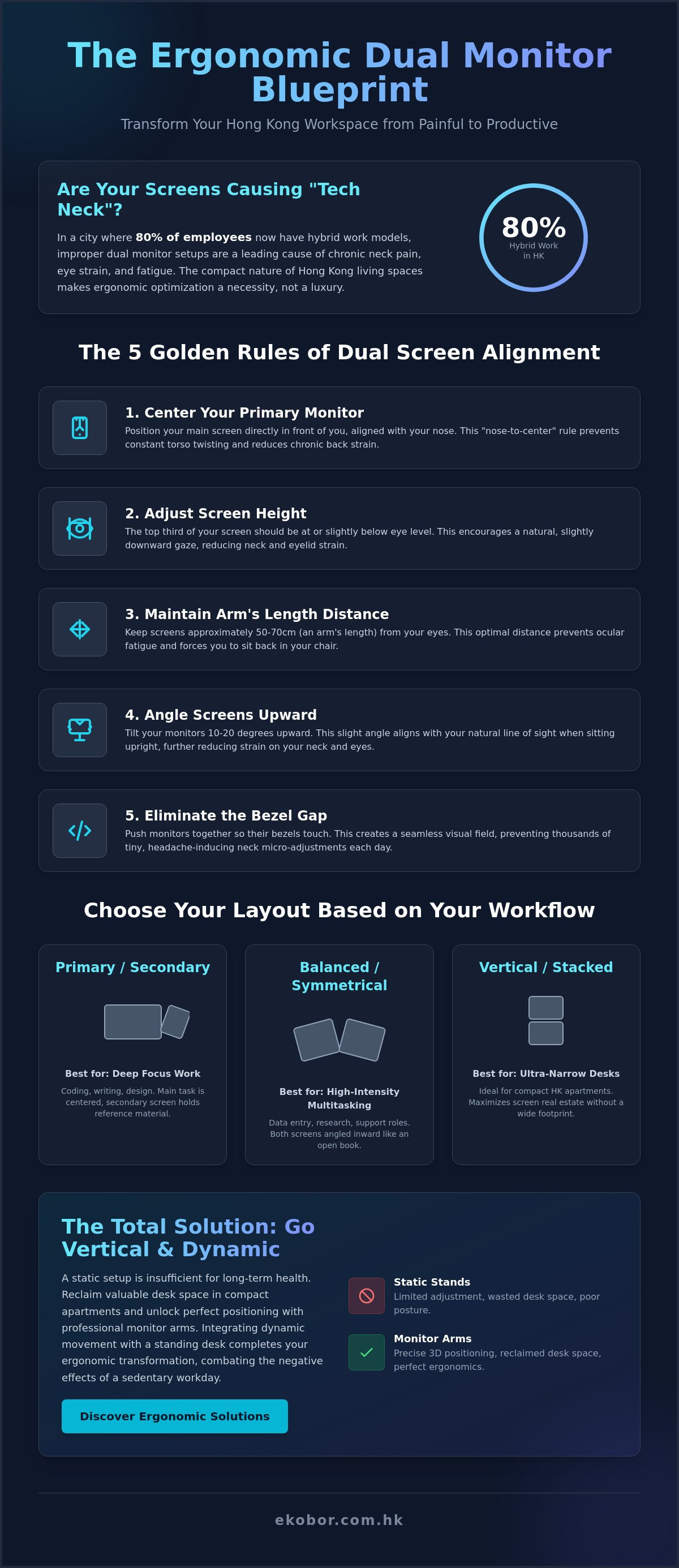
Achieving the perfect visual alignment requires a systematic approach that respects your body's physiological limits. Most users simply place screens side by side, but this often leads to micro-trauma in the neck and shoulders. To master how to set up dual monitors ergonomically Hong Kong professionals must focus on five core steps. First, position your primary monitor directly in front of your nose to prevent the torso twisting that causes chronic back strain. Second, adjust the screen height so the top third of the display is at eye level. This matches the ergonomic office setup guidelines which suggest a slightly downward gaze to reduce eyelid strain.
- Distance: Maintain an arm's length (50-70cm) between your eyes and the screens to prevent ocular fatigue.
- Tilt: Angle the monitors 10 to 20 degrees upward to accommodate the natural resting angle of your vision.
- Flexibility: Use Ergotron Lx Pro monitor arms to achieve the precise 3D positioning that standard fixed stands cannot provide.
If you're struggling with a cramped workspace, investing in professional-grade monitor arms allows you to float your screens, instantly reclaiming desk space for your keyboard and documents.
Choosing Your Layout: Primary vs. Balanced
Your daily tasks should dictate your screen arrangement. Coding, writing, or deep-focus work benefits most from a Primary/Secondary configuration, where one screen is centered and the other is angled to the side for reference. Conversely, a Balanced/Symmetrical layout is ideal for high-intensity multitasking or data entry, with both screens angled inward like an open book. For ultra-narrow Hong Kong desks, a vertical or stacked layout is a brilliant way to maximize screen real estate without expanding your horizontal footprint.
Fine-Tuning for Neck Health
In a balanced setup, the point where the two monitors meet should be the exact center of your vision. This is the "Center-Point" rule. Never place a monitor so far to the side that it requires more than a 15-degree neck turn, as this creates asymmetrical tension in your cervical spine. You can use modern ergonomics principles to audit your setup daily. Small adjustments in the morning prevent significant pain by the evening, ensuring your workstation supports your health rather than compromising it.
Solving the Hong Kong Space Constraint
Fitting dual 27-inch monitors onto a standard 120cm by 60cm Hong Kong desk feels like a complex geometric puzzle. Most international advice assumes you have a spacious home office, but the reality of urban living requires a more creative approach to how to set up dual monitors ergonomically Hong Kong style. Monitor arms are the essential tool for this transformation. By lifting your screens off the desk surface, you reclaim the "under-monitor" real estate that is typically lost to bulky plastic stands. This newly cleared space is vital for your keyboard, mouse, and tactile documents, allowing for a cleaner, more focused environment that reduces mental clutter.
Choosing the right mounting system is your next step. C-clamp mounts are a favorite for renters in Hong Kong because they attach to the edge of the desk without any drilling. If your desk is pushed flush against a wall or features a cable hole, a Grommet mount provides even greater stability for heavy high-resolution displays. Integrating these tools with smart cable management strategies further reduces visual noise. When your wires are tucked neatly along the arm, you eliminate the chaotic "nest" of cables that often contributes to stress in small, shared living spaces.
Maximising Depth on Shallow Desks
Standard monitor stands often fail on shallow 60cm desks because they push the screens too close to your face. This proximity violates the core principles of a dual monitor setup guide, which emphasizes maintaining a healthy focal distance. You can solve this by using an "offset" arm position. By mounting the arm slightly to the side and extending it, you can push the screens further back toward the wall. The Ergotron Lx Pro monitor arms are particularly effective for this, offering the precise depth control needed to protect your vision in tight quarters.
Vertical Stacking: The HK 'Secret Weapon'
If your desk is exceptionally narrow, vertical stacking is your secret weapon. This configuration saves roughly 50% of your horizontal desk width by placing one monitor above the other. While this requires careful management of vertical neck flexion, it's often more comfortable than the extreme horizontal rotation required by wide side-by-side screens on a small desk. For those using a laptop as a second screen, placing your external monitor directly above the laptop creates a streamlined, space-efficient workstation that fits perfectly in a small study corner.
Ready to reclaim your desk and protect your posture? Explore our curated selection of standing desks and ergonomic accessories to build your ideal Hong Kong home office today.
The Total Solution: Integrating Movement and Support
A perfect dual-monitor configuration provides the visual framework for a productive day, but it's only half of the wellness equation. Human bodies are designed for movement, not for remaining static for eight hours. Even with the best alignment, stationary positions lead to muscle fatigue and reduced circulation. Integrating your screens with a standing desk hong kong professionals trust allows you to transition between sitting and standing, which is the gold standard for long-term spinal health.
When you shift to a standing position, you must adjust your monitor height "on the fly." Your eye level relative to the desk surface changes slightly depending on your footwear and posture. This is where high-quality monitor arms become indispensable. They allow you to maintain the top-third eye-level rule regardless of whether you're sitting or standing. The foundation of your neck's health actually starts at your lower back. A high-quality ergonomic chair hk with robust lumbar support stabilizes your pelvis, which prevents the slouching that forces your head forward toward the screens.
Active Sitting with Dual Screens
Active sitting is a transformative concept for dual-monitor users. Chairs like the HAG Capisco feature a movement-centric design that encourages you to shift positions naturally while you work. This constant, subtle motion keeps your core engaged and prevents the common "forward lean" that occurs when you're deeply focused on multiple data streams. True workspace excellence isn't about one piece of equipment; it's the synergy between your desk, chair, and screen alignment.
Implementation: Taking the Next Step
Mastering how to set up dual monitors ergonomically Hong Kong style requires a holistic view of your environment. Use this 2026 checklist to audit your progress:
- A dual-motor electric standing desk for smooth height transitions.
- A movement-centric ergonomic chair to support active sitting.
- A dual-arm monitor system for precise 3D screen positioning.
For corporate teams looking to optimize productivity, seeking a professional office furniture hong kong consultation ensures your setup meets international health standards. We invite you to visit our Causeway Bay showroom to experience the Ergotron Lx Pro and HAG series in person. Testing these solutions firsthand is the best way to understand how high-end design can transform your daily professional life and long-term physical well-being.
Transform Your Professional Well-being
Mastering how to set up dual monitors ergonomically Hong Kong style is a vital investment in your long-term health and productivity. By aligning your screens with your natural visual field and reclaiming desk depth with professional monitor arms, you eliminate the root causes of Tech Neck and digital eye strain. A truly elite workspace doesn't just look professional; it functions as a supportive partner in your daily physiological health. Transitioning from a cluttered, static desk to a dynamic environment that encourages movement is the key to maintaining cognitive endurance in our high-intensity city.
Your journey toward a healthier office environment starts with the right equipment and expert guidance. Upgrade your workspace with EKOBOR's premium ergonomic solutions to experience the synergy of high-end design and clinical necessity. As an authorized Ergotron and HAG dealer in Hong Kong, we offer specialized tools like the Ergotron Lx Pro and 10-year on-site warranties on our electric standing desks. Visit our showrooms in Causeway Bay or Kowloon Bay for an expert ergonomic assessment. Our team is ready to help you build a setup that protects your posture and empowers your performance every single day.
Frequently Asked Questions
Is it better to have dual monitors or one ultrawide monitor for ergonomics?
Dual monitors offer superior multitasking flexibility, while ultrawide monitors provide a seamless visual field. For ergonomics, dual setups are often preferred because you can angle each screen independently to match your natural eye arc. This flexibility is essential for preventing neck strain when switching between reference materials and primary tasks. An ultrawide requires a deep desk to maintain a proper focal distance, which is often a luxury in Hong Kong apartments.
How do I fix my neck pain from dual monitors if I have a small desk?
You can fix neck pain on a small desk by using monitor arms to reclaim depth and vertical space. Lifting your screens off the desk allows you to push them further back toward the wall, maintaining the recommended arm's length distance. This simple change prevents you from hunching forward. Mastering how to set up dual monitors ergonomically Hong Kong style means utilizing verticality to ensure your cervical spine remains in a neutral, stress-free position.
What is the correct height for dual monitors when using a standing desk?
The correct height for dual monitors at a standing desk is exactly the same as when sitting; your eyes should align with the top third of the screen. When you stand, your posture naturally shifts, so you'll need to make minor height adjustments to keep your neck neutral. High-quality monitor arms allow for these quick transitions, ensuring your visual field remains optimal and your shoulders stay relaxed throughout the day.
Do I need a dual monitor arm or two single monitor arms for a better setup?
Two single monitor arms generally provide better ergonomic flexibility than one dual monitor arm. Single arms allow you to adjust each screen's height, depth, and tilt independently, which is vital if your monitors aren't identical. This precise 3D positioning is the best way to learn how to set up dual monitors ergonomically Hong Kong workers find, as it accommodates the unique constraints of smaller workstations and varied screen sizes.
Can I set up dual monitors ergonomically using a laptop and one external screen?
You can certainly create an ergonomic dual-monitor setup using a laptop, provided you use a laptop riser or a dedicated arm to lift the screen. The laptop display must match the height of your external monitor to prevent repetitive neck flexion. This configuration is a space-saving "secret weapon" for home offices, allowing you to maintain professional posture without needing a massive desk to accommodate two full-sized screens.
How do I align monitors of different sizes and resolutions ergonomically?
To align monitors of different sizes, focus on matching the center-point of the screens or the top edges to create a consistent horizontal gaze. Use your operating system's display settings to adjust the scaling so that windows don't jump in size when moving between screens. This reduces cognitive load and prevents your eyes from constantly readjusting to different text sizes, which is a major cause of digital fatigue during long workdays.


