



Monitor Arm Hong Kong: The Ultimate 2026 Guide to Ergonomic Productivity
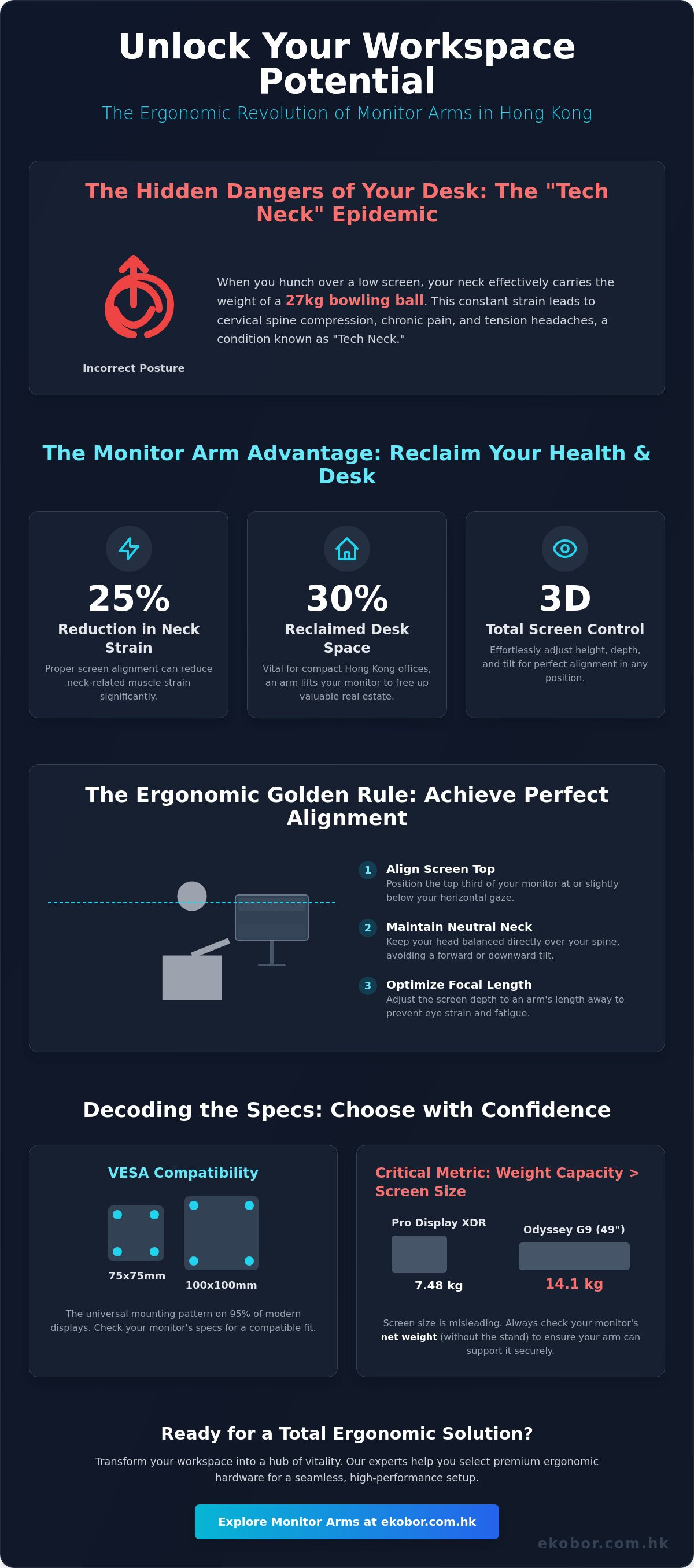
Is your monitor height slowly reshaping your spine? Most professionals in high-density districts accept chronic neck tension as an unavoidable part of the 50-hour work week, yet your workstation setup is the most important health choice you make daily. Selecting the ideal monitor arm hong kong doesn't just clear the clutter from a small city desk; it serves as a clinical intervention for your posture. Research from 2024 indicates that proper screen alignment can reduce neck-related muscle strain by 25 percent, yet many users still struggle with fixed-height stands that force a painful downward gaze.
You've likely felt the physical toll of a sedentary lifestyle and the frustration of a cramped workspace that limits your focus. We promise to help you reclaim your well-being and your desk real estate through a total solution for your office. This 2026 guide explores the latest ergonomic innovations to help you achieve perfect eye-level alignment and a seamless, minimalist setup. You'll learn exactly how to transform your current office into a high-performance hub that promotes Wellness at Work and supports your musculoskeletal health through every hour of the workday.
Key Takeaways
- Understand how 3D screen positioning combats the "Tech Neck" epidemic and protects your cervical spine from long-term compression.
- Learn why weight capacity is a more critical metric than screen size when choosing support for the latest ultrawide and curved displays.
- Compare single and dual configurations to identify the ideal monitor arm hong kong professionals need to balance deep focus with high-intensity multitasking.
- Discover space-saving installation techniques, including wall-mounted options designed to optimize the shallow desks typical of compact Hong Kong apartments.
- Explore how a "Total Solution" approach and expert consultation can help you select premium ergonomic hardware that transforms your workspace into a hub of vitality.
The Science of Sight: Why a Monitor Arm is Essential for Hong Kong Professionals
A monitor mount, or monitor arm, is a flexible mechanical bracket designed to replace the standard, static factory stand. It provides a full range of 3D motion, allowing you to adjust the height, depth, and tilt of your screen with effortless precision. In a city where 12-hour workdays are common, the right monitor arm hong kong professionals choose can be the difference between chronic pain and peak performance. It's not just a desk accessory; it's a fundamental tool for spinal health.
Hong Kong's "Tech Neck" epidemic is a direct result of improper screen heights that lead to cervical spine compression. When you hunch over a low screen, your neck effectively carries the weight of a 27kg bowling ball. Beyond physical health, space is a premium luxury in our city. Utilizing an arm reclaims up to 30% of your desk real estate, which is vital in compact Hong Kong apartments where every square inch matters. A clean, minimalist workspace clears mental clutter and significantly boosts daily productivity.
To visualize how these ergonomic tools function in a professional setting, watch this expert breakdown:
Ergonomic Alignment and Musculoskeletal Health
The "Golden Rule" of ergonomics is simple but often ignored. You should align the top third of your screen with your horizontal gaze. This positioning ensures your neck stays in a neutral posture, preventing the strain that leads to tension headaches. Focal length is the distance between the eye and the screen surface to prevent eye strain. By optimizing this distance and adjusting the tilt to eliminate overhead glare, you reduce the workload on your eyes and shoulders. These small adjustments create a cumulative benefit for your musculoskeletal health over the long term.
The Dynamic Workspace: Beyond Static Sitting
Static sitting is a significant health risk that we aim to eliminate through our "Wellness at Work" philosophy. High-quality arms are essential components that complement a standing desk Hong Kong setup by allowing for seamless transitions. When you move from a sitting to a standing position, your viewing angle changes. You must adjust the screen tilt to maintain proper alignment. Choosing a monitor arm hong kong users can rely on encourages "micro-movements" throughout the day. These subtle shifts in posture keep your spine flexible and your circulation active, providing a Total Solution for the modern office environment.
Decoding Technical Specs: VESA, Weight Capacity, and Movement Range
Your physical health depends on the precise alignment of your digital tools. Selecting a high-quality monitor arm Hong Kong professionals trust involves understanding the engineering behind the support. VESA compatibility is the universal mounting hole pattern found on the back of 95% of modern displays. Most screens utilize either a 75x75mm or 100x100mm configuration, which serves as the foundational link between your screen and its ergonomic support. Adhering to ergonomic principles is vital to prevent musculoskeletal strain during long hours of deep work.
Calculating Your Monitor’s Compatibility
Screen size is often a misleading metric. While a box might say 32 inches, the internal components determine the actual strain on the mounting arm. You must identify the "net weight" of your screen, which is the weight of the display alone after removing the factory stand. For instance, an Apple Pro Display XDR weighs approximately 7.48kg without its base; meanwhile, a 49-inch Samsung Odyssey G9 can reach 14.1kg. Choosing an arm that barely meets these limits often leads to "monitor sag," where the screen slowly tilts downward over time. Always select a mount with a capacity that exceeds your monitor's net weight by at least 15% to ensure long-term stability and spinal protection.
Gas Spring vs. Mechanical Tension
The internal mechanism dictates how you interact with your workspace daily. Gas spring arms offer a premium, silent experience. They use pressurized cylinders to allow for "one-finger" adjustments, making them the ideal choice for professionals who frequently shift between sitting and standing positions. Mechanical spring arms are built for durability and heavy-duty, static-heavy setups. They rely on coiled steel tension, which is less prone to gas leakage over a decade of use. High-end mechanical systems are typically tested for over 10,000 adjustment cycles, whereas budget alternatives often suffer from "drift" within the first 12 months of ownership. Investing in a robust monitor arm Hong Kong solution ensures your screen stays exactly where you place it for optimal eye level.
Range of motion defines your freedom at the desk. A professional arm should offer at least 90 degrees of tilt, 180 degrees of swivel, and 360 degrees of rotation. This flexibility allows you to transform your screen from a landscape productivity hub into a vertical coding or reading station instantly. Extension and retraction limits are equally important in compact Hong Kong offices; they allow you to push the screen back to reclaim desk space when you aren't using the computer. You can explore our range of ergonomic monitor supports to find the perfect match for your specific hardware and wellness needs.
Single vs. Dual Monitor Arms: Comparing Setup Configurations for HK Offices
Choosing the right configuration depends on your workflow and the physical constraints of your workspace. In Hong Kong, where desk depth often averages just 60cm to 70cm, every inch of reclaimed surface area matters. A single monitor arm hong kong setup serves as the minimalist choice for deep focus. It's particularly effective for professionals who rely on a primary screen for concentrated tasks like coding or long-form writing. By integrating a laptop tray, you can transform your MacBook into a secondary reference screen while keeping your primary monitor at a medically sound eye level. This prevents the "C-curve" slouch common among laptop users.
Dual monitor arms represent the standard for high-intensity multitasking. Research conducted by the University of Utah shows that users can complete tasks up to 44% faster when moving from a single screen to a dual setup. For those working in the compact offices of Central or Quarry Bay, side-by-side arrangements might feel cramped. Stacked configurations offer a space-saving secret by utilizing vertical real estate. This allows for a panoramic visual experience without requiring a wider desk. Achieving a seamless bezel alignment is critical here to prevent eye strain caused by constant refocusing between mismatched heights.
Specialized triple or quad setups cater to the specific needs of Hong Kong’s financial traders and creative producers. These configurations provide a holistic view of complex data streams or expansive video timelines. When selecting your hardware, verify that your displays adhere to the VESA mount standard to ensure a secure fit. This technical foundation is vital for maintaining the structural integrity of your ergonomic station and protecting your technology investment.
The Productivity Benefits of Dual Screens
The efficiency gain from dual screens isn't just about screen size; it's about reducing the cognitive load of switching tabs. Studies indicate that dual monitors can increase task efficiency by 40% for data-heavy workflows. In narrow Hong Kong offices, the stacked arrangement is often the superior choice. It keeps your primary work directly in front of you while placing secondary communications, like email or Slack, just a slight neck tilt away. This verticality preserves the health of your cervical spine by encouraging a more upright posture.
Choosing Between Independent Arms and Crossbars
Independent arms provide maximum flexibility. They allow you to tilt, rotate, and pivot each monitor separately. This is ideal if you use screens of different sizes or prefer one in portrait mode for reading long documents. Conversely, crossbar systems offer perfect synchronization for identical monitors. They ensure your screens remain perfectly level with a single point of adjustment. For corporate teams, this choice is a fundamental part of office workspace planning. Selecting the right mechanical support reduces musculoskeletal health risks across the entire department while optimizing the floor plan for better efficiency.
Installation and Compatibility: Setting Up Your Workspace in Small HK Apartments
Integrating a monitor arm hong kong into a compact urban living space requires a strategic approach to hardware selection. Most users face a choice between a C-Clamp and a Grommet mount. The C-Clamp is the preferred "Total Solution" for renters because it requires zero drilling; it simply grips the edge of your desk. For those with a pre-drilled cable hole, the Grommet mount offers a cleaner, centered aesthetic. If your desk is exceptionally shallow, perhaps less than 50cm deep, a wall-mounted arm becomes the ultimate space-saver. This configuration reclaims 100% of your desktop surface area for essential tasks and tactile work.
Fragile surfaces, such as tempered glass or thin laminates, present unique challenges. You shouldn't attach a high-tension clamp directly to these materials. We recommend using a steel reinforcement plate to distribute the 15kg to 25kg of localized pressure across a wider area. This small addition prevents structural failure and protects your investment in premium furniture. It's a simple step that ensures your Sit-to-Stand transition remains stable and secure throughout the workday.
Desk Material and Thickness Considerations
Not all desks support the concentrated force of a heavy display. Popular IKEA-style desks often utilize a paper honeycomb core. These surfaces can collapse under the pressure of a standard clamp if not properly reinforced. Solid wood or metal-framed desks typically require a minimum thickness of 10mm and a maximum clearance of 85mm for most professional-grade clamps. Ensure your setup has at least 15cm of rear wall clearance. This space allows the mechanical joints to pivot freely without scratching your apartment walls or restricting your range of motion.
Cable Management and Aesthetics
A cluttered desk creates mental friction and disrupts your "Wellness at Work." Professional HK designers prioritize integrated cable channels to hide the "spaghetti" of power and display wires. When routing these cables through the arm's internal chassis, leave approximately 10cm of slack at the pivot points. This prevents tension from damaging your monitor ports when you adjust the height or tilt. Achieving a seamless floating effect isn't just about looks; it's about creating a frictionless environment that supports long-term musculoskeletal health and cognitive focus.
Why EKOBOR is the Top Choice for Premium Monitor Arms in Hong Kong
Finding the right monitor arm hong kong requires more than just a quick purchase; it's a vital investment in your long-term musculoskeletal health. EKOBOR stands at the intersection of clinical expertise and high-end design. We don't just sell furniture. We provide a pathway to a pain-free work life through carefully selected hardware and expert guidance. Our team understands the unique constraints of Hong Kong workspaces, where every square inch must be optimized for both comfort and performance.
We've curated a selection of world-class brands that meet our rigorous standards for durability and physiological support. Our expert consultants work closely with you to match your specific monitor weight and desk thickness to the ideal arm. This personalized approach prevents the common frustration of sagging screens or incompatible mounts. Whether you're setting up a focused home office or coordinating a corporate floor for 200 employees, our professional installation services ensure every unit is calibrated for immediate use.
Ergotron: The Gold Standard of Monitor Arms
Ergotron remains the benchmark for professionals who demand longevity and precision. The Ergotron LX Pro series is engineered for a lifespan exceeding 10 years of daily adjustment. It's the preferred choice for HK professionals who value sustainability over disposable hardware. The secret lies in the patented Constant Force™ technology. This mechanical system allows you to lift, swing, or tilt your screen with a light touch, maintaining its position without the need for constant tightening.
The materials used in the LX and HX series reflect a commitment to both health and the environment. These premium arms are constructed from high-grade metals that avoid the off-gassing associated with cheaper plastics. For users with heavy, ultra-wide displays, the HX series provides the robust support needed to keep 49-inch monitors stable and perfectly aligned with your eye level. It's a seamless blend of heavy-duty engineering and elegant aesthetics.
Wellness at Work: The EKOBOR Difference
We believe that a single piece of hardware is only one part of a larger picture. We integrate every monitor arm hong kong into a total ergonomic solution designed to transform your daily routine. When you visit our showrooms in Causeway Bay or Kowloon Bay, you can experience the movement firsthand. We offer complimentary ergonomic assessments to help you understand how spinal alignment impacts your energy levels and productivity.
Our mission is to support the Hong Kong community by fostering a "Sit-to-Stand" culture that combats the risks of a sedentary lifestyle. By choosing EKOBOR, you're partnering with a wellness consultant dedicated to your vitality. We take the time to explain the science behind your setup, ensuring you know how to adjust your tools as your tasks change throughout the day.
Ready to elevate your workspace and protect your health? Visit our showroom or shop Ergotron monitor arms online today to begin your transformation.
Elevate Your Health and Performance for 2026
Transforming your workspace isn't just about aesthetics; it's a vital investment in your musculoskeletal health. By selecting a high-performance monitor arm hong kong professionals can finally achieve perfect spinal alignment while reclaiming valuable desk real estate in compact urban apartments. Whether you choose a single or dual configuration, ensuring VESA compatibility and proper weight capacity remains the foundation of a "Total Solution" for your home or office. It's time to move beyond the limitations of a static desk setup.
As an Official Ergotron Partner in HK, EKOBOR draws upon 110+ years of corporate heritage to deliver medical-grade ergonomic support. Our expert team provides on-site installation to ensure your setup meets the precise standards of the "Sit-to-Stand" culture. You don't have to settle for neck strain or a cluttered environment when a seamless solution is within reach. We're here to help you prioritize your "Wellness at Work" and embrace a more vibrant, productive way of living. Your body will thank you for making this change today.
Upgrade Your Workspace: Shop Premium Monitor Arms at EKOBOR
Frequently Asked Questions
Do monitor arms fit all monitors?
Most monitors manufactured after 2020 are compatible with monitor arms if they feature standard VESA mounting holes. Approximately 90% of modern flat-panel displays follow this universal standard. If your specific screen lacks these holes, you'll need a non-VESA adapter bracket to secure it safely. Always verify your screen's weight against the arm's capacity to ensure long-term spinal support and stability.
Will a monitor arm damage my desk?
A high-quality monitor arm won't damage a solid wood or steel desk when you install it correctly with protective padding. For desks made of hollow-core particle board, the concentrated pressure can cause cracks or sagging over 12 months of daily use. We recommend using a reinforcement plate to distribute the 5 to 10 kilograms of force across a larger surface area to protect your investment.
What is VESA compatibility and how do I check it?
VESA is the industry standard for mounting interfaces, typically appearing as a square or rectangular hole pattern on the back of your screen. You check it by measuring the distance between the hole centers in millimeters. The most common patterns are 75x75mm or 100x100mm. Choosing the right monitor arm hong kong solution ensures your screen stays at eye level to prevent musculoskeletal strain.
Can I use a monitor arm with a laptop?
You can use a monitor arm with a laptop by attaching a dedicated laptop tray or holder. This setup transforms your portable device into a healthy workstation by raising the screen to your natural line of sight. It's a key component of our Wellness at Work philosophy. This configuration effectively reduces neck flexion by 20 degrees compared to placing a laptop directly on a desk surface.
Are dual monitor arms better than two single arms?
Dual monitor arms save more desk space, but two single arms offer 30% more flexibility in positioning and alignment. Single arms allow you to move each screen independently, which is vital for users with different screen sizes or those who switch between portrait and landscape modes frequently. This setup provides a Total Solution for complex digital workflows while maintaining optimal ergonomic alignment.
How much weight can a premium monitor arm hold?
Premium monitor arms typically support between 2 and 15 kilograms per arm. Heavy-duty models designed for 49-inch ultrawide displays can handle up to 19.1 kilograms. Exceeding these limits can compromise the internal gas spring mechanism and lead to screen drooping. Always check your specific monitor weight without the original stand to ensure your monitor arm hong kong choice maintains its tension.
Can I install a monitor arm on a standing desk?
Yes, monitor arms are essential for a Sit-to-Stand culture because they allow you to fine-tune screen height as your posture shifts. When you transition from sitting to standing, your eye level often changes by 2 to 5 centimeters. A gas-spring arm lets you make these micro-adjustments instantly. This ensures your musculoskeletal health remains protected throughout your entire eight-hour workday.
Is it worth buying an Ergotron monitor arm in Hong Kong?
Ergotron is a worthwhile investment because their patented Constant Force technology is tested to last 10,000 cycles, which equals roughly 10 years of daily use. In the dense Hong Kong urban environment, maximizing desk depth is crucial. These arms reclaim 15% of your usable workspace while providing the precision needed for a professional ergonomic setup. They represent a premium standard in durable office design.


