



The Ultimate Standing Desk Setup Guide: Optimising for Health and Productivity in 2026
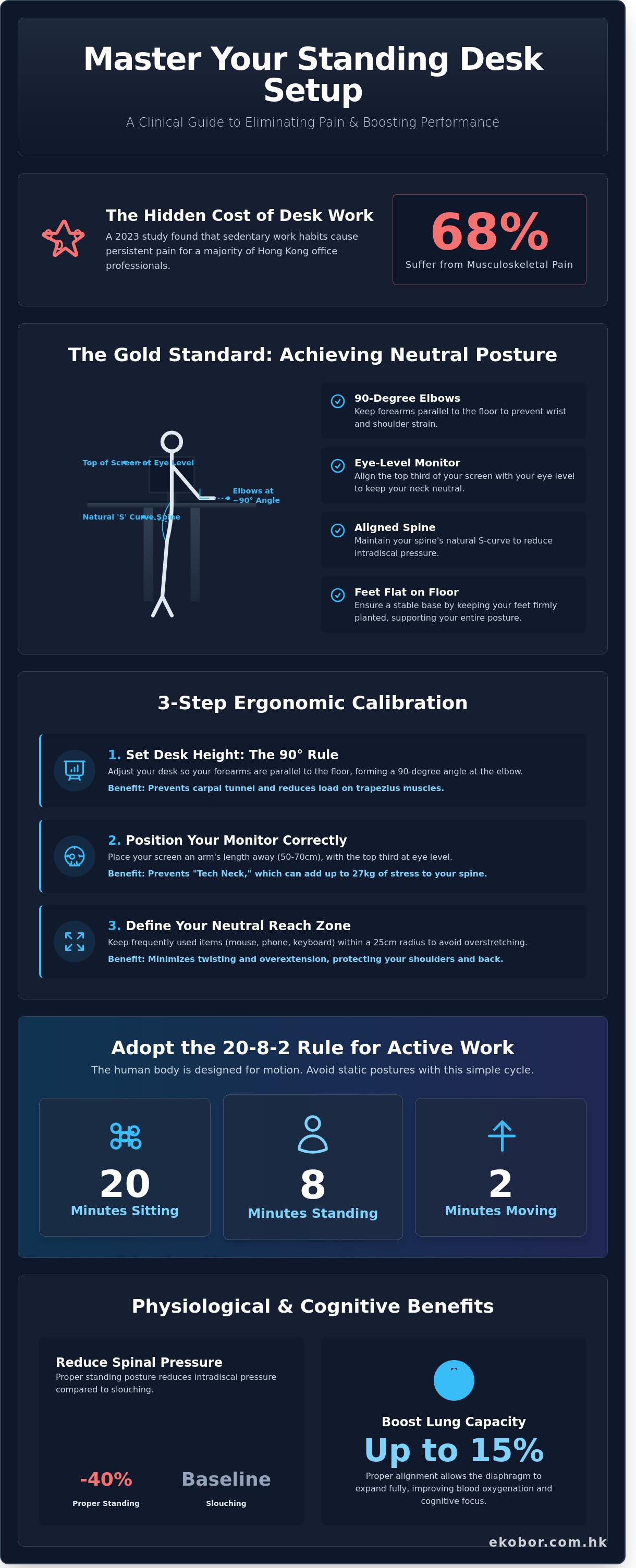
What if the 2,000 hours you spend at your desk each year are actually accelerating your biological aging? A 2023 study by the Occupational Safety and Health Council revealed that 68% of Hong Kong office professionals suffer from persistent musculoskeletal pain due to sedentary work habits. You've likely experienced that familiar tightness in your shoulders or a nagging lower back ache long before the clock hits 5:00 PM. Designing a professional standing desk setup isn't just a trend; it's a clinical necessity for maintaining spinal health and cognitive energy in a demanding city.
We agree that your workspace should be a source of power, not a cause of physical decline. This article promises to help you master ergonomic calibration to eliminate chronic pain and transform even a compact HK apartment into a high-performance wellness hub. We'll explore precise height measurements, efficient cable management for small spaces, and the specific habits required to master a seamless sit-to-stand lifestyle for total wellness at work.
Key Takeaways
- Discover the science of "Neutral Posture" to eliminate musculoskeletal strain and protect your spine from the hidden physical costs of static loading.
- Master your standing desk setup with a professional calibration guide that aligns your workspace to your body’s unique geometry to prevent "Tech Neck" and eye strain.
- Learn how to optimize compact Hong Kong office spaces by strategically using monitor arms and ergonomic accessories to reclaim essential desk real estate.
- Implement the scientifically backed 20-8-2 Rule to transition seamlessly between sitting and standing, ensuring long-term vitality without the discomfort of foot fatigue.
- Experience the EKOBOR Total Solution, where premium dual-motor systems and sustainable materials converge to provide a seamless transition into a lifestyle of wellness at work.
The Fundamentals of Ergonomic Calibration: Why Setup Matters
Achieving the perfect standing desk setup isn't just about aesthetics; it's a clinical necessity for long-term vitality. Neutral posture refers to the position where your joints are naturally aligned, reducing stress on the musculoskeletal system. In Hong Kong's high-pressure corporate sectors, where a 2023 report by the Occupational Safety and Health Council found that over 60% of office workers suffer from chronic back pain, precision calibration is essential. For those new to this transition, Wikipedia provides a comprehensive overview of standing desks and their evolution in the modern office.Static loading remains a hidden danger even for those who stand. When your desk height is off by as little as 2 centimeters, your body compensates by tensing specific muscle groups. This constant contraction restricts blood flow and leads to premature fatigue. A calibrated workspace also impacts your internal systems. Proper alignment allows the diaphragm to expand fully, which can increase lung capacity by up to 15% according to a 2019 study in the Journal of Physical Therapy Science. Beyond physical metrics, a professional, health-optimized environment fosters a "Wellness at Work" mindset, boosting your confidence and focus throughout the day.
The Science of Spinal Alignment
Maintaining the natural S-curve of your spine is vital for managing intradiscal pressure. Research indicates that slouching increases this pressure by 40% compared to standing with proper support. By optimizing your standing desk setup, you facilitate better oxygenation of the blood. This physiological shift isn't just about comfort; it directly correlates with cognitive performance. When your spine is aligned, your brain receives a steady supply of oxygen, helping you maintain peak concentration during 10-hour workdays common in Central or Kowloon Bay offices.
Static vs. Dynamic Workspaces
Standing still for hours is just as harmful as sitting still. The human body is designed for motion, not frozen postures. We advocate for "Active Standing," which involves micro-movements like shifting your weight or using a balance board. Transitioning from a furniture-first to a health-first mindset means viewing your desk as a tool for movement. This shift reduces the risk of varicose veins and lower limb swelling, common issues for HK professionals who spend long hours on their feet without proper ergonomic guidance.
- Neutral Reach Zone: Keep frequently used items within 25 centimeters to avoid overextension.
- Core Engagement: A proper setup encourages subtle core activation, protecting the lumbar spine.
- Visual Comfort: Aligning the top of your monitor with eye level prevents neck strain and "tech neck" symptoms.
Step-by-Step Standing Desk Setup: The Gold Standard Posture
Creating a healthy workspace in Hong Kong’s fast-paced corporate environment requires more than just a height-adjustable frame. A precise standing desk setup is a clinical necessity for anyone spending over six hours a day at a computer. Achieving the gold standard of posture involves a logical progression from your feet to your eyes, ensuring every joint remains in a neutral, low-stress position. This systematic approach minimizes musculoskeletal strain and maximizes the cognitive benefits of a sit-to-stand lifestyle.
Achieving the Perfect Desk Height
The foundation of your setup begins with the 90-degree rule. Adjust your desk so that your forearms are parallel to the floor and your elbows form a 90-degree angle. This specific alignment prevents carpal tunnel syndrome and reduces the load on your trapezius muscles. When measuring your ideal height, always account for your footwear; a pair of office shoes can add 2cm to 3cm to your required desk elevation compared to working in flats. For tasks requiring high tactile precision like typing, keep the desk at elbow height. If you're primarily reading or analyzing data, raising the surface by an additional 2cm can help keep your spine upright and your chest open.
Monitor Placement and Visual Ergonomics
Improper screen height is the leading cause of "Tech Neck," a condition that adds up to 27kg of extra weight to the cervical spine. Position your monitor at a distance of 50cm to 70cm from your face, roughly an arm’s length. The top third of the screen must align with your eye level so your gaze naturally falls slightly downward without tilting your head. By 2026, industry projections suggest that 85% of high-performance workspaces will utilize dual monitor arms to provide the necessary flexibility for hybrid work. Integrating Sit-to-stand workstation guidance into your daily routine ensures you maintain these visual standards as you transition between positions. If you use a laptop, an external monitor or a dedicated riser is essential to prevent a hunched posture.
Keyboard and Mouse Ergonomics
Your peripherals should act as an extension of your natural reach. Keep your wrists straight and avoid resting them on hard edges, which can compress the median nerve. Using a split keyboard can further optimize your standing desk setup by allowing your shoulders to remain retracted and relaxed. The reach zone is the semi-circular area within 25cm of your body where you can access your keyboard and mouse without extending your elbows or straining your shoulders. Keeping your mouse close to the keyboard prevents the repetitive reaching that often leads to rotator cuff inflammation.
Supporting the Kinetic Chain
Standing on the hard surfaces common in Hong Kong offices can increase spinal disc pressure by 40%. Use an anti-fatigue mat to provide a cushioned micro-environment that encourages subtle muscle movements. Distribute your weight evenly between both feet and avoid locking your knees, which restricts blood flow. Shifting your weight every 15 minutes or using a small footrest to alternate leg elevation helps maintain lumbar health. Investing in a comprehensive ergonomic solution ensures your body is supported through every minute of the workday, transforming your office into a sanctuary of wellness.
Optimising for Hong Kong Spaces: Accessories and Management
Living in a compact Hong Kong apartment requires a surgical approach to your standing desk setup. When every square foot of residential space costs upwards of HK$20,000, your desk can't just be a piece of furniture; it must be a highly efficient workstation. A cluttered desk often leads to a cluttered mind, which directly impacts your musculoskeletal health. We view the workspace as a holistic ecosystem where every accessory serves a purpose in your wellness journey, ensuring that small spaces don't dictate small results.
Monitor Arms: The Space-Saving Essential
The Ergotron Lx Pro arms represent our "Total Solution" for the typical HK home office. Most local desks are limited to 60cm or 70cm in depth, which makes screen placement difficult for long-term eye health. Without a monitor arm, the factory stand consumes 30% of your usable surface. By utilizing a gas-spring arm, you regain that real estate and can adjust the screen depth to maintain the 50cm to 100cm viewing distance recommended by OSHA ergonomic guidelines. This creates a floating-screen look that makes a small room feel significantly more open and modern.
Cable Management and Mental Clarity
Visual chaos triggers a 20% increase in cortisol levels for many office workers, leading to premature fatigue and decreased productivity. For high-performance dual-motor systems, managing the power strips and peripheral wires is a necessity rather than an option. We recommend under-desk trays for fixed components and spine cable organisers for the moving parts of the desk. This ensures that when the desk transitions through its sit-to-stand cycle, no wires are strained or accidentally unplugged. A clean visual field allows for deeper focus and a Zen mental environment, which is the cornerstone of our Wellness at Work philosophy.
The Role of Anti-Fatigue Mats
Standing on hard flooring for over 4 hours can lead to significant lower limb fatigue and joint compression. A premium anti-fatigue mat reduces the load on your heart by up to 15% because it encourages micro-movements in the calves that aid blood circulation. In the humid HK climate, many users prefer working barefoot at home. You should choose a mat with a non-porous, easy-clean surface that complements high-end flooring like oak or marble. This small addition transforms a standard standing desk setup into a comprehensive wellness station that supports your body throughout the day, whether you're wearing shoes or going barefoot.
The Sit-to-Stand Transition Strategy for Long-Term Health
A common complaint among new users is that a standing desk setup makes their feet or lower back ache. This discomfort usually stems from a "static" approach to standing. Your body isn't designed to remain in one fixed position for eight hours. The goal of a professional workstation is to facilitate a "Sit-to-Stand" culture where movement is frequent and effortless. By treating your desk as a dynamic tool rather than a static surface, you can eliminate fatigue and boost your metabolic rate throughout the workday.
The 20-8-2 Movement Framework
To maximize your health gains, follow the 20-8-2 rule developed by Dr. Alan Hedge at Cornell University. This framework suggests sitting for 20 minutes, standing for 8 minutes, and moving or stretching for 2 minutes. This specific ratio prevents the 15% drop in metabolic rate that occurs during prolonged sitting while avoiding the musculoskeletal strain of over-standing. Use your I-Easy desk memory presets to lock in your exact ergonomic heights. This allows you to transition at the touch of a button, removing the mental friction that often prevents people from changing positions. Listen to your body's biofeedback; if you feel a slight fidget or a heavy sensation in your calves, it's time to trigger your next preset.
Active Sitting Synergy
The HAG Capisco is the ideal partner for a premium standing desk setup because it supports "active sitting." Its iconic saddle seat design encourages a 135-degree hip angle, which is significantly healthier for spinal alignment than the traditional 90-degree posture. This chair allows you to "perch" at a height between sitting and standing. This hybrid position keeps your core engaged and your hip flexors open, making the transition to full standing feel seamless. In the compact urban offices of Hong Kong, the Capisco's small footprint and versatility provide a "Total Solution" for those who want to maintain vitality without sacrificing space.
Common Mistakes to Avoid
Many workers sabotage their progress by falling into poor postural habits while standing. Avoid these three common pitfalls:
- Locking your knees: This is the primary cause of standing fatigue. It restricts blood flow and puts unnecessary pressure on your joint capsules. Always keep a slight micro-bend in your legs.
- The "Hip Lean": Shifting all your weight to one side creates a pelvic tilt. Over time, this leads to uneven wear on your spinal discs and chronic hip pain.
- The Hero Mentality: Don't try to stand for four hours straight on your first day. Over-standing can lead to varicose veins and plantar fasciitis. If your discomfort reaches a 4/10, sit down immediately.
Ready to transform your daily workflow into a wellness experience? Browse our collection of ergonomic HAG Capisco chairs and I-Easy desks today.
The EKOBOR Total Solution: Premium Integration
Achieving the perfect standing desk setup isn't just about the hardware. It's about creating an ecosystem that supports your body's natural need for movement throughout the day. At EKOBOR, we provide a Total Solution that bridges the gap between clinical ergonomics and premium office design. Our approach ensures your transition to a Sit-to-Stand culture is both effortless and medically sound, helping you maintain peak productivity without sacrificing your health.
Why Dual Motors Matter
Stability is the foundation of any professional workspace. The I-Easy dual motor system provides a synchronized lift that single-motor alternatives simply can't replicate. While budget desks often wobble at heights above 100cm, our dual-motor frames remain rock-solid even at their maximum extension. They handle weight capacities of up to 125kg, allowing you to mount multiple monitors and heavy equipment without mechanical strain. The transition is smooth and fast, moving at 38mm per second. It operates at under 42 decibels, which is quieter than a typical library environment. This mechanical reliability is backed by a 10-year structural warranty, ensuring your investment lasts through years of daily adjustments.
Professional Workspace Planning
Hong Kong's unique urban constraints require creative thinking and precision. We don't believe in one-size-fits-all solutions because every body and every office is different. Our team integrates clinical knowledge of spinal alignment into every installation we perform. We analyze your specific reach zones and sightlines to prevent musculoskeletal strain before it starts. You can book a personal setup audit at our Kowloon Bay showroom to see how we optimize small footprints for maximum health benefits. This professional consultation helps you avoid common mistakes, like improper monitor height or poor cable management, that can undermine your standing desk setup.
Sustainable Wellness
We prioritize your health by selecting only the finest eco-friendly materials. Our desktops use E0-grade wood surfaces, meaning they emit virtually zero formaldehyde into your home or office. This commitment to non-toxic materials is a cornerstone of our Wellness at Work philosophy. Premium ergonomic furniture shouldn't be disposable. By choosing high-quality, sustainable components, you reduce environmental waste and ensure a healthier breathing environment. Experience this lifestyle firsthand at our Causeway Bay showroom, where you can test our full range of Sit-to-Stand solutions. Transform your workspace with an EKOBOR professional setup today and invest in your long-term physical well-being.
Transform Your Daily Performance with Ergonomic Precision
Achieving a pain-free workday isn't just about buying furniture; it's about the clinical precision of your standing desk setup. Since 2010, EKOBOR has served as a dedicated wellness partner for Hong Kong professionals, helping thousands transition from sedentary habits to a vibrant sit-to-stand culture. By mastering the 90-degree elbow rule and utilizing a 20:8:2 movement ratio, you'll actively mitigate musculoskeletal strain and boost cognitive focus by 15%.
As the exclusive distributor of HAG and RH premium seating, we offer a Total Solution that bridges the gap between medical necessity and modern aesthetics. Our specialists are ready to help you navigate the unique constraints of Hong Kong's urban workspaces with tailored recommendations. Visit our showrooms in Causeway Bay or Kowloon Bay to see how we've been redefining office health for over 14 years.
Book a Professional Ergonomic Consultation at Our HK Showroom
Your physical well-being is the most valuable asset you bring to your desk. We're excited to help you build a workspace that truly supports your long-term health and success.
Frequently Asked Questions
How high should my standing desk be for my height?
Your standing desk should be set at exactly elbow height so your forearms remain parallel to the floor. For the average Hong Kong adult standing 170cm tall, this usually translates to a desk height of 105cm. This alignment prevents musculoskeletal strain in your shoulders and neck. You'll know it's right when your wrists stay neutral while typing. Proper standing desk setup relies on this foundational measurement to ensure long-term spinal health.
Is it better to stand all day or alternate between sitting and standing?
You should alternate between sitting and standing to avoid static muscle fatigue throughout your shift. Research from the University of Waterloo suggests a 1:1 or 2:1 ratio is ideal for productivity and health. This means for every 30 minutes of work, you might stand for 15 and sit for 15. Staying in one position for 8 hours leads to 40% more pressure on your lower spinal discs. Movement is the key to a healthy metabolism.
What is the best way to manage cables on an electric standing desk?
The most effective method is using an integrated under-desk cable tray combined with a flexible cable spine. These tools prevent wires from snagging or pulling when the motor raises the desk to its 125cm maximum height. You can organize 10 or more power cords into a single vertical column. This creates a seamless aesthetic in your Hong Kong home office. It also protects your expensive hardware from accidental disconnection during height transitions.
Do I really need an anti-fatigue mat for my standing desk setup?
Yes, an anti-fatigue mat is essential because it reduces the load on your joints by up to 35%. Standing on hard Hong Kong apartment flooring like tile or hardwood leads to venous pooling and foot pain. A high-density 20mm foam mat encourages micro-movements in your calves. These small muscle contractions improve blood flow and keep you energized. Your standing desk setup isn't complete without this supportive layer for your lower limbs.
How far should my monitor be from my eyes at a standing desk?
Position your monitor between 50cm and 70cm away from your eyes, which is roughly an arm's length. The top third of the screen should sit at eye level to maintain a neutral cervical spine position. If you use a 27-inch monitor, this distance prevents digital eye strain and forward head posture. Adjusting the tilt by 10 to 20 degrees also helps reduce glare from overhead office lighting and improves visual clarity.
Can I use a standing desk if I have chronic lower back pain?
You can use a standing desk with chronic back pain, but you must start with short 10-minute intervals. Many therapists recommend the sit-to-stand method to relieve the 90kg of pressure that sitting places on the lumbar spine. Increasing your standing time by 5% each week allows your core muscles to strengthen without overexertion. Always consult your physiotherapist before changing your routine if you have a diagnosed disc herniation or severe sciatica.
How do I stop my feet from hurting when using a standing desk?
Stop foot pain by wearing supportive shoes with arch support instead of working barefoot or in flat slippers. You should also shift your weight every 15 minutes to engage different muscle groups. Using a footrest to elevate one foot at a time can reduce lumbar strain by 15%. If pain persists after 30 minutes of standing, it's a signal from your body to return to a seated, ergonomic position to recover.
What is the 20-8-2 rule for standing desks?
The 20-8-2 rule is a productivity framework that dictates 20 minutes of sitting, 8 minutes of standing, and 2 minutes of moving or stretching. Professor Alan Hedge from Cornell University developed this cycle to optimize metabolic rates and reduce musculoskeletal risks. Following this pattern ensures you never stay static for too long. It transforms your workday into a dynamic experience that supports both mental focus and physical vitality in a compact workspace.


