



Desk Organizing Accessories Guide 2026: Optimising Your Hong Kong Workspace for Ergonomics
What if the persistent tension in your neck isn't caused by your workload, but by the specific way your smartphone and documents are positioned? In Hong Kong, where the average living space is approximately 161 square feet per person, your desk often becomes a chaotic battleground for space. You likely feel the daily frustration of navigating a "cable jungle" while trying to maintain focus. It's a common struggle to find a balance between a functional workstation and a healthy body when your monitor sits at the wrong height and your surface is covered in tech debris.
At Ekobor, we believe that Wellness at Work starts with a Total Solution for your immediate environment. By integrating the right desk organizing accessories, you can transform a cramped corner into a high-performance hub that actively supports your musculoskeletal health. This guide will show you how to eliminate physical strain and reclaim your productivity through smarter spatial design. We'll explore essential ergonomic tools, from precision monitor arms to seamless cable management, specifically curated for the unique constraints of the Hong Kong workspace. It's time to transition from a sedentary, cluttered habit to a vibrant, organized professional life.
Key Takeaways
- Master the "Reach Zone" concept to minimize musculoskeletal strain by strategically placing frequent tools within a 30cm radius of your body.
- Learn how to distinguish between standard supplies and premium desk organizing accessories that offer the weight capacity and stability required for professional ergonomic setups.
- Unlock vertical organization strategies tailored for the unique Hong Kong micro-office to maximize your desk footprint without compromising on efficiency.
- Discover how a "Total Solution" approach to workspace design fosters a healthier "Sit-to-Stand" culture and enhances your long-term workplace vitality.
Beyond Tidiness: Why Desk Organizing Accessories are Crucial for Ergonomics
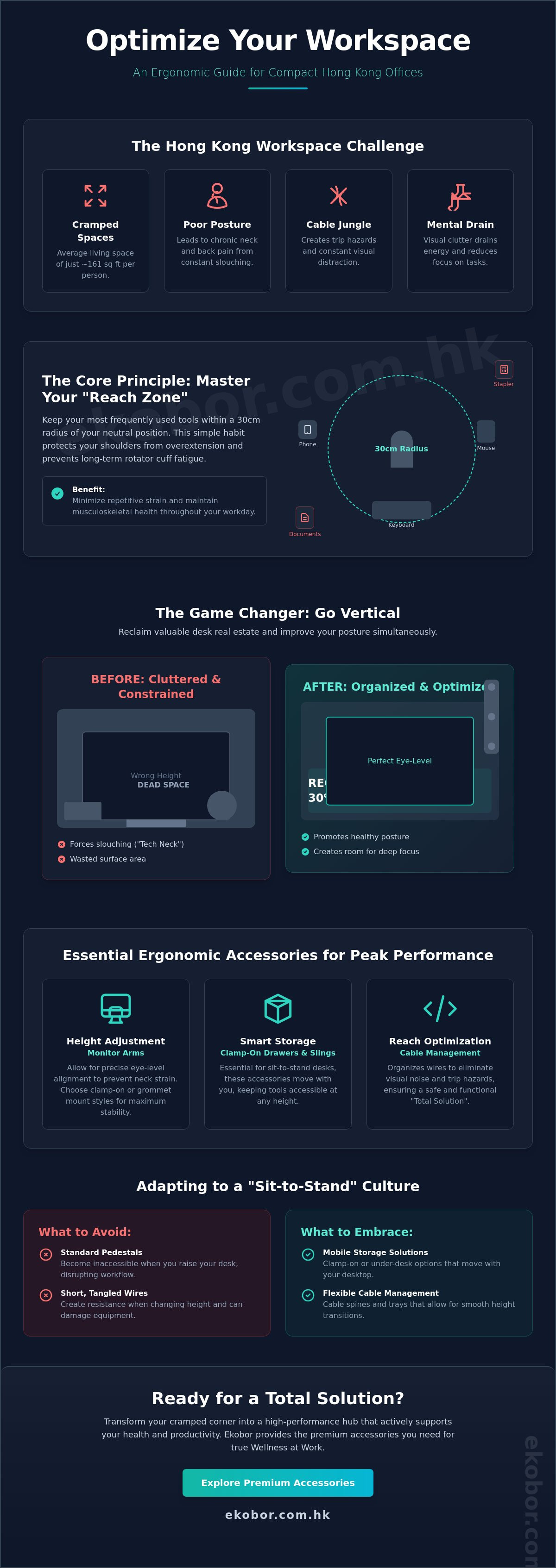
Ergonomic desk organization isn't just about maintaining a tidy surface for aesthetics. It's the strategic placement of your essential tools to minimize repetitive reach and physical strain throughout the day. By applying the principles of ergonomics, you transform your workspace into a high-performance environment that supports your body's natural alignment. A central concept in this transformation is the "Reach Zone." You should keep your most frequently used items, such as your mouse, keyboard, and phone, within a 30cm radius of your neutral position. This proximity protects your shoulder health by preventing the constant overextension that leads to rotator cuff fatigue.
To visualize how a transformation can look in a compact urban setting, watch this aesthetic makeover:
In Hong Kong’s high-pressure work culture, clutter does more than take up space. It creates a significant cognitive load. A disorganized desk forces your brain to constantly filter out visual "noise," which drains mental energy and reduces your ability to focus on complex tasks. Utilizing premium desk organizing accessories like monitor arms can reclaim up to 30% of your usable desk surface area. This extra room isn't just a luxury. It provides the physical breathing room necessary for deep focus and efficient workflow transitions.
The Link Between Organization and Musculoskeletal Health
A cluttered desk is often a direct cause of poor posture. When your essential tools are buried, you naturally lean in or twist your spine to access them. These awkward postures, held for hours, are primary drivers of chronic back and neck pain. Effective cable management is another vital component of a healthy workspace. It removes trip hazards and prevents equipment damage, ensuring your "Total Solution" remains safe and functional. True wellness at work requires accessories that support fluid movement rather than restricting it.
Standing Desk vs. Standard Desk Accessories
Adopting a sit-to-stand culture requires a different approach to storage. Standard pedestals often become inaccessible when you transition to a standing height. Instead, you need specialized desk organizing accessories like clamp-on drawers or under-desk slings that move with the desktop. Cable flexibility is equally critical. If your wires are too short or tangled, you'll feel resistance when trying to change heights, which often leads to a sedentary slump. For more context on building your foundation, refer to our ultimate guide to choosing a standing desk in Hong Kong to ensure your accessories complement your mechanical setup perfectly.
Essential Categories of Ergonomic Desk Accessories for Peak Performance
To build a high-performance workspace in Hong Kong, you need to look beyond simple aesthetics. We categorize desk organizing accessories into three primary ergonomic functions: height adjustment, reach optimization, and smart storage. While a designer desk lamp is a nice-to-have element, a monitor arm is a must-have for any professional spending over 40 hours a week at a computer. Proper placement reduces musculoskeletal strain and prevents the onset of chronic pain. In a city where office space is a premium commodity, every accessory must earn its place by improving your physical well-being.
Monitor Arms: Reclaiming Your Vertical Space
Standard monitor stands often force users into a slouching posture. Premium arms like the Ergotron Lx Pro allow for precise eye-level alignment, which is the primary defense against "tech neck." When you select your hardware, consider the mounting style carefully. Clamp-on options work best for desks with a thickness of 12mm to 50mm, while grommet mounts require a pre-drilled hole for maximum stability. For professionals managing complex data sets across multiple displays, the EKOL3T Dual Arms Clamp Desk supports two screens, ensuring a seamless visual flow. Following a professional how-to guide ensures your screen is always at the correct distance to reduce eye fatigue and neck tension.
Keyboard Trays and CPU Holders
Adjustable keyboard trays are the secret to perfect elbow-angle ergonomics. They allow your shoulders to remain relaxed while keeping your forearms parallel to the floor. A neutral wrist position is achieved when the tray tilt matches your natural arm angle, which effectively prevents carpal tunnel symptoms. You shouldn't neglect the floor space either. CPU Server Holders lift the tower off the ground, protecting it from dust accumulation and making office cleaning more efficient. This setup is essential for maintaining a "Total Solution" approach to both hardware longevity and personal health.
Integrated Storage: Drawers and Cabinets
Hong Kong's limited office footprints have triggered a shift from bulky 1.5-meter filing cabinets to slim, integrated storage. Modern under-desk drawers provide quick access to essentials without sacrificing vital legroom. If you need mobility, mobile pedestals offer flexible storage that follows you as you transition between sitting and standing. EKOBOR cabinet solutions provide secure document handling for sensitive files while maintaining a minimalist aesthetic. Integrating these ergonomic enhancements transforms a cluttered surface into a streamlined hub of productivity that supports your long-term vitality.
Choosing the Right Accessories: Ergonomic vs. Standard Solutions
Selecting desk organizing accessories is a strategic investment in your musculoskeletal health rather than a simple aesthetic choice. Cheap plastic organizers often fail under the pressure of daily use, leading to a cluttered mind and a strained body. Professional-grade gear utilizes aerospace-grade aluminum and reinforced steel to ensure your workspace remains a stable foundation for productivity. While a standard plastic tray might cost less upfront, it lacks the structural integrity required for a high-performance environment.
Material Quality and Weight Capacity
Investing in high-quality materials prevents the hidden costs of budget shopping. A plastic monitor stand might save you HK$200 today, but it often lacks the strength to support a professional 32-inch monitor, which can weigh up to 9kg. When screens wobble, your eyes and neck muscles constantly micro-adjust to compensate. This leads to tension headaches and digital eye fatigue. Gas-spring monitor arms offer a superior experience because they allow for fluid, one-handed height adjustments. This flexibility is vital for maintaining proper office ergonomics as you shift between sitting and standing positions.
Stability extends to every touchpoint in your "Total Solution" workspace. Premium standing mats and keyboard trays must feature high-traction, non-slip surfaces to prevent repetitive strain. Always verify weight specifications before purchasing. If an accessory isn't rated for at least 1.5 times the weight of your device, it's a liability. Professional ergonomic accessories typically come with 5-year to 10-year warranties, reflecting a build quality that standard supplies cannot match. This longevity protects you from the "buy it twice" cycle that plagues cheap alternatives.
Installation and Desk Compatibility
Hong Kong's unique real estate market means many professionals work from rented apartments or compact home offices with specific furniture constraints. A frequent mistake involves purchasing heavy-duty desk organizing accessories that require drilling into delicate glass or thin MDF surfaces. This oversight often results in permanent desk damage, which is a costly problem for those needing to return a flat in its original condition.
The advantage of the modern "Sit-to-Stand" culture is the development of renter-friendly, clamp-on solutions. Self-install cable baskets and monitor mounts provide a secure fit without leaving a single mark on your furniture. These tools transform a chaotic tabletop into a streamlined environment of wellness. For a deeper look at selecting the right foundations for these tools, refer to our office furniture Hong Kong guide. Choosing professional gear helps you avoid secondary costs like physical therapy, which can easily exceed HK$1,200 per session in districts like Central or Tsim Sha Tsui. High-grade tools are an insurance policy for your spine and your wallet.
A Practical Guide to Organising Small Hong Kong Workspaces
The HK micro-office is a unique challenge where every centimetre dictates your productivity. In a city where residential units average 484 square feet, your desk often doubles as a dining table or a creative studio. You can't afford to waste space on inefficient layouts. Using high-quality desk organizing accessories allows you to reclaim your environment. This isn't just about tidiness; it's about protecting your physiology. A cluttered desk forces you into awkward postures, leading to the "tech neck" issues common among local professionals.
Maximising Verticality and Under-Desk Real Estate
Monitor arms act as the primary tool for vertical expansion. By elevating your screen to the correct ergonomic height, you free up the 25% of desk surface typically occupied by bulky monitor stands. This creates a "total solution" where your tools are accessible but out of the way. Sliding keyboard trays complement this by moving your input devices off the main surface, allowing you to maintain a neutral wrist position. For ultra-compact setups where a full-sized ergonomic chair won't fit, standing is the healthiest alternative. The EKOBOR Pressure Relief Standing Mat is designed for these tight quarters. It encourages micro-movements in your legs, which prevents the blood pooling and lower back fatigue associated with standing on hard HK apartment flooring.
Cable Management for Small Desks
Visual clutter translates directly into mental fatigue. "Cable spaghetti" makes a small room feel even smaller and creates a sense of unfinished business. Effective cable management is crucial for those adopting a sit-to-stand lifestyle. Snake-style managers guide your wires safely during height adjustments, preventing snags and keeping the aesthetic seamless. Renters often worry about damaging furniture, but clamp-on accessories solve this problem. The Self Install- Clamp On Cable Basket requires zero drilling. It keeps your power strips and adapters off the floor, which simplifies cleaning and reduces fire risks in humid climates. By choosing desk organizing accessories that don't require permanent modification, you remain mobile and flexible in your living arrangements.
Explore our full range of ergonomic desk organizing accessories to reclaim your workspace today.
Transform Your Office with EKOBOR’s Premium Accessory Collection
Achieving a high-performance workspace in Hong Kong requires more than just a high-quality desk. It demands a Total Solution that addresses every physical interaction you have with your environment. At EKOBOR, we curate our collection to serve as a comprehensive wellness ecosystem for professionals. Our approach focuses on health-first design, ensuring that every addition to your setup actively prevents musculoskeletal issues rather than just providing storage. By integrating premium desk organizing accessories into your daily routine, you transition from a sedentary work style to a dynamic, health-conscious experience.
Our commitment to the Hong Kong market goes beyond retail. We understand the specific constraints of local office spaces and the physical toll of long hours in the finance and tech sectors. We use durable, industrial-grade materials that withstand years of constant adjustment. Every product reflects our "Wellness at Work" philosophy, turning your workstation into a tool for longevity. Investing in your desk isn't just about aesthetics; it's a calculated investment in your long-term spinal health and mental clarity.
Spotlight on Standout Products
The EKOL3T Dual Arms are a cornerstone for multi-taskers who need to maintain perfect eye-level alignment across two screens. These arms eliminate the neck craning that often leads to chronic tension. For those managing limited floor space, our CPU Server Holder is essential. It lifts your hardware off the ground, protecting it from dust while clearing legroom for better circulation. To complete your "Sit-to-Stand" transition, the Pressure Relief Standing Mat is a non-negotiable partner. It reduces fatigue by up to 40 percent by encouraging micro-movements in your calves and ankles during long standing sessions.
The EKOBOR Advantage in Hong Kong
We invite you to experience these innovations firsthand at our dedicated showrooms in Causeway Bay or Kowloon Bay. Touching the materials and testing the mechanical fluidity of our desk organizing accessories allows you to visualize your own transformation. Our professional consultants provide customized layouts, ensuring your accessory placement follows strict ergonomic principles tailored to your height and reach. We remain committed to sustainable, high-performance solutions that respect both the user and the environment.
Ready to redefine your productivity and protect your posture? Explore the full range of EKOBOR Desk Organizing Accessories today and take the first step toward a healthier professional life.
Elevate Your Health and Efficiency in the Modern Hong Kong Office
Investing in your workspace is a direct investment in your long-term musculoskeletal health. By choosing high-quality desk organizing accessories, you're doing more than clearing clutter; you're creating a precise ergonomic environment that supports your spine and boosts daily productivity. Hong Kong's unique urban constraints demand a thoughtful approach to space. Every square inch must serve a dual purpose of efficiency and physical wellness to combat the risks of a sedentary lifestyle.
EKOBOR provides a "Total Solution" for professionals who refuse to compromise on quality. Our collection features premium materials and includes a 10-year on-site warranty, giving you peace of mind and lasting support. You can experience these ergonomic innovations firsthand at our dedicated showrooms in Causeway Bay and Kowloon Bay. Our specialists are ready to help you navigate the specific challenges of a compact city office. It's time to transform your environment into a sanctuary of vitality and focus.
Shop EKOBOR’s Ergonomic Desk Accessories Now
Frequently Asked Questions
Do I really need a monitor arm if my monitor already has a stand?
Yes, a monitor arm is essential for achieving the precise eye-level alignment that factory stands rarely provide. Most standard stands lack the height range to prevent "tech neck," which can place up to 27kg of additional pressure on your cervical spine. By elevating your screen, you free up valuable desk surface area in compact Hong Kong offices and promote a neutral spine position.
Are clamp-on desk accessories safe for glass or fragile desk surfaces?
Clamp-on accessories aren't generally safe for glass surfaces unless you use specialized reinforcement plates or the glass is tempered to at least 10mm thickness. For fragile surfaces, we recommend choosing freestanding alternatives or accessories with wide-surface pressure pads. These distribute the weight more evenly to prevent hairline fractures or structural failure during daily use.
How much weight can a standard ergonomic keyboard tray hold?
A standard ergonomic keyboard tray typically supports between 5kg and 10kg of weight. This capacity is more than sufficient for a full-sized mechanical keyboard, a mouse, and the resting weight of your forearms. It's vital to check the specific load rating of your desk organizing accessories to ensure the sliding mechanism remains smooth and doesn't sag over time.
What is the best way to manage cables on a standing desk that moves frequently?
A flexible cable spine or "vertebrae" system is the most effective solution for height-adjustable desks. These specialized desk organizing accessories protect your wires from tension or pinching as the desk moves from 65cm to 125cm. Always group your cables with 15% extra slack to ensure they don't disconnect or damage the ports during rapid transitions between sitting and standing.
Can I install these accessories myself, or do I need professional help?
Most ergonomic accessories are designed for simple DIY installation using basic tools like a screwdriver or an Allen key. You can typically complete the setup of a monitor arm or cable tray in 15 to 30 minutes. If you're outfitting a full corporate office in Central or Kowloon, professional assembly services ensure every component meets international ergonomic safety standards.
What are the most important accessories for a child’s ergonomic desk setup?
An adjustable footrest and a monitor riser are the most critical additions for a child's workspace. These tools help maintain the "90-90-90" posture rule where hips, knees, and elbows are all bent at right angles. Since children in Hong Kong spend over 6 hours daily on digital devices, these accessories prevent early-onset musculoskeletal issues and support healthy spinal development.
How do I choose between a single and a dual monitor arm for my HK office?
Choose based on your primary workflow and the horizontal width of your desk. A single arm is ideal for deep-focus tasks, while dual arms can enhance productivity by 42% for multi-taskers managing spreadsheets or design projects. Ensure your desk can handle the combined weight of two screens, which often exceeds 12kg, especially in smaller HK apartments where desk stability is paramount.
Will these accessories fit on non-EKOBOR standing desks?
Yes, our ergonomic desk organizing accessories utilize universal mounting standards like the VESA 75x75mm and 100x100mm patterns. They're compatible with any desk surface between 15mm and 50mm thick. Whether you're using a custom-built table or another brand's sit-to-stand frame, these tools integrate seamlessly to create a total solution for your health and productivity.


